Beating the Credit Meter: Local LLM + MCP Inside BurpSuite

TL;DR
BurpSuite’s built-in AI is powerful but credit-metered and Pro-only. I wanted the same locally, without burning credits, and even on Community Edition. So I built a small BurpSuite extension that talks to a local LLM (via Ollama or similar) or to an MCP client (Claude Desktop / VS Code MCP).
The model proposes candidates; the extension mutates the seeded request and fires variants through Burp so logging, auth, proxy, and scope stay intact.
Why not just use Burp’s AI?
Because credit meters change how you test. Burp’s AI (and similar cloud features) are great, but:
It’s Pro-only and credit-metered; credits deplete fast under real fuzz-iterate workflows.
Continuous iteration on internal/staging traffic becomes a budgeting exercise.
I wanted a local-first, human-in-the-loop flow where Burp remains the control plane and nothing leaves my box unless I say so.
So I built the thing I wanted.
What I built (and why it’s different)
Local LLM Assistant (Montoya API) — a Burp extension that adds a Local LLM tab and context menu action.
Key differences vs credit-metered AI:
Works on Community Edition — no Pro lock-in.
No credits, no cloud — run your own model with Ollama or any approved local runtime.
MCP bridge — if you don’t have a local model, route via an MCP client (Claude Desktop / VS Code MCP) that can fetch seeds and send variants through Burp.
Burp stays the network control plane — all traffic is visible in Burp’s Logger; auth, proxy, and scope rules still apply.
How it helps in practice
Seed from Burp
Right-click any request → Use this request as seed. The extension extracts params by location (URL / BODY / JSON / COOKIE) and cookies.
Two generation modes
Command mode: pick vulnerability family (SQL/NoSQL/XSS/etc.), choose location and count → get candidate inputs instantly.
Prompt mode: write a short instruction (“vary boolean/time-based checks”) → get a structured list.
Send through Burp
The extension mutates the seeded request and fires variants in parallel via Burp’s HTTP stack (optionally add each to Repeater).
Encoding variants
Turn on URL/Base64/HTML encoding to cover boring but useful permutations.
Timing & observability
See generation time, send time, and total wall-clock — makes it obvious whether the model or the network is the bottleneck.
Results I’m seeing
On representative staging runs: ~11–20s end-to-end (generate + send), down from ~3–4 minutes in my first prototype.
The wins came from parallel sends and a stricter structured output format. Fewer context switches; faster triage.
This doesn’t replace human judgment. It just removes keystrokes so I can spend time on auth edges, tenant boundaries, weird encodings, and evidence.
Where AI helps — and where it doesn’t
Helps
Quickly proposing benign detection inputs
Covering dull variants + alternate encodings
Promoting “plausible” cases into Repeater for human digging
Doesn’t replace
Understanding auth flows, tenant isolation, data paths
Turning a quirky response into a verified finding with evidence
Severity/exploitability judgment and remediation
Guardrails (by design)
Human-in-the-loop: no autonomous crawling; I select the seed and click Send.
Authorized targets only: defaults and docs emphasize staging/lab use.
Local-first: local model or MCP via a local bridge with optional bearer tokens.
Observability: everything flows through Burp’s Logger.
Architecture at a glance
Burp extension (control plane): mutates the seed, fires via Burp’s HTTP stack (Logger/Repeater visible).
Tiny HTTP bridge:
/v1/seed,/v1/sendendpoints the MCP client or local model can call.Model: local runtime (Ollama etc.) or MCP client.
Crucial: the LLM never talks directly to the target; Burp owns network I/O.
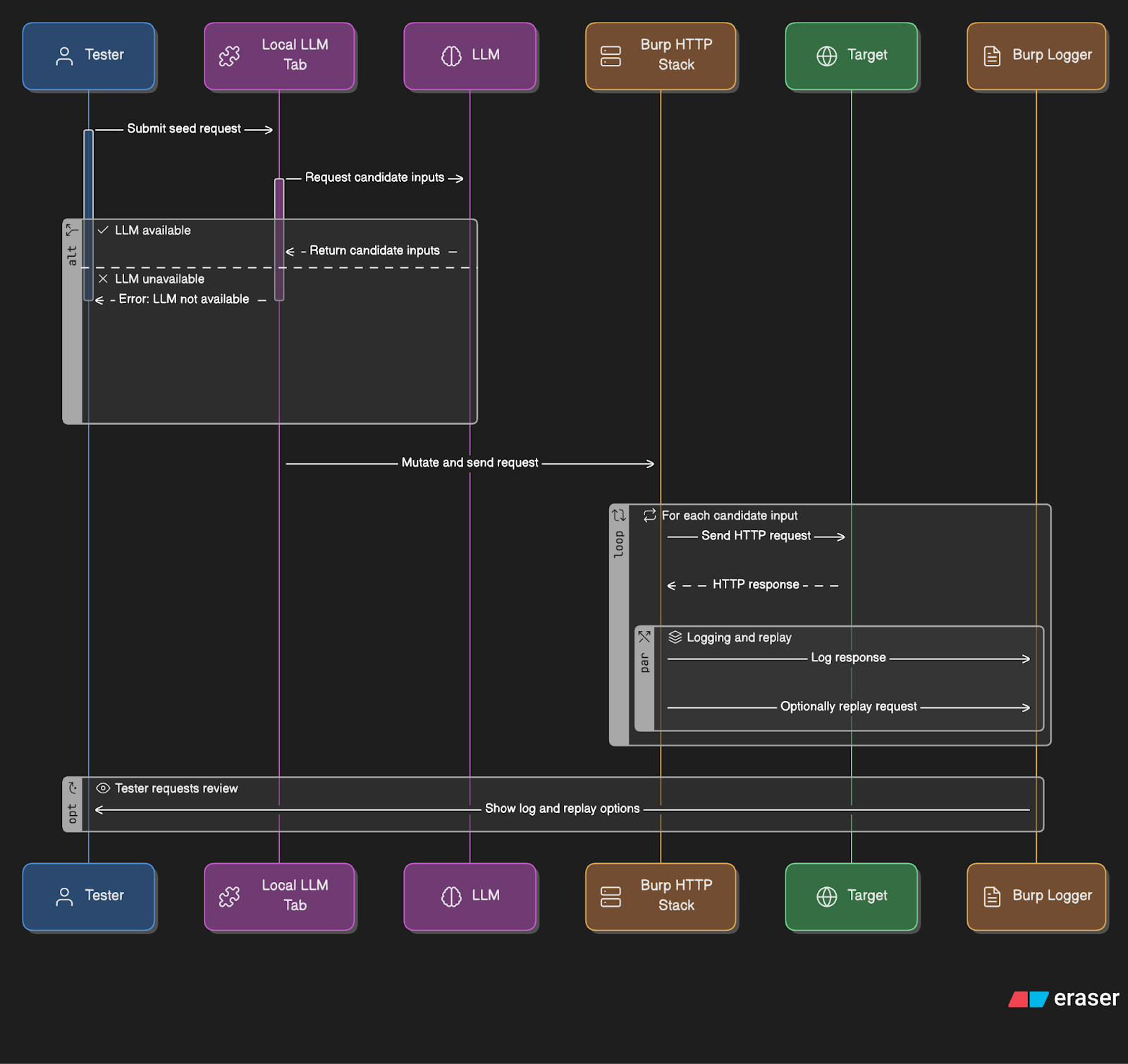
Quick start
Repo: github.com/KaustubhRai/BurpSuite_LocalAI
Build the JAR or install the release JAR in Burp → Extensions → Add.
Pick your brain:
Local: run Ollama (or another approved local runtime) and set Base URL/Model in the extension tab, or
MCP: enable the MCP bridge and register the MCP server in your client (Claude Desktop / VS Code).
Right-click a request → Use as seed → choose Command or Prompt mode → Send.
Watch Logger (Sources → Extensions) for traffic, status, size, and timings.
Roadmap
Auto-iterate: time-boxed rounds of plan → send → observe → rank by response deltas (status/latency/body/header), keep top-K, tweak strategy.
Playbooks: repeatable sequences for common test families.
Assertions library: non-destructive checks and diffing to speed triage.
All still human-started and scope-bound. The model proposes; Burp executes.
About the author
Application Security Engineer
Comments
Join the discussionNo comments yet. Be the first to comment.


